- Home
- Equipment Rental
- Rental Intelligence
Equipment Rental Intelligence
From rental data to rental intelligence
STAEDEAN Equipment Rental IQ brings together data from your rental ERP, CRM, telematics, service systems, and other sources in one rental intelligence platform on Microsoft Azure and Microsoft Fabric. This gives rental teams a broader view to put more equipment to work and protect margin.
See Equipment Rental IQ in action


Name
Role
Equipment Rental IQ
A strong rental ERP like STAEDEAN Equipment Rental gives you control over every contract, asset, movement, and invoice. It is the operational record of your business
But the best rental decisions draw on more than that. What’s in the sales pipeline next month? How hard are your machines really working? Will the weather delay the job? When is this customer likely to off-rent? That information lives across CRM, telematics, service systems, spreadsheets, and external sources, and no single system brings the full picture together.
Equipment Rental IQ brings this information together in one central platform, alongside your ERP rather than inside it. Your rental data comes together in the Unified Rental Data Model, with consistent definitions for contracts, rental types, equipment, locations, customers, utilization, and more.
On top of this foundation, you get rental KPIs, answers to questions in plain language, and AI agents that use connected rental data to support rental decisions.
Scroll down to see how Equipment Rental IQ can benefit your business.
Key Challenges
Limited visibility into equipment availability
Equipment data is spread across multiple systems
Equipment decisions without the full picture
Key Features
Scroll to
One Unified Rental Data Model
Your rental ERP remains the operational record. Equipment Rental IQ brings that data together with information from other systems, using consistent definitions for contracts, equipment, customers, locations, and utilization.
Out-of-the-box connections cover STAEDEAN Equipment Rental ERP and CRM and Microsoft Rental Management. Additional sources, such as telematics, service and finance systems, other ERPs, and external data, can be connected and configured for your business.
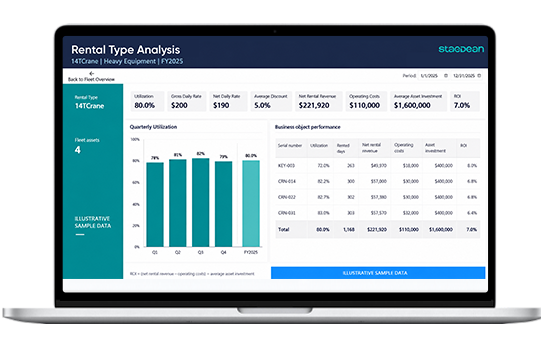
Explore your rental data
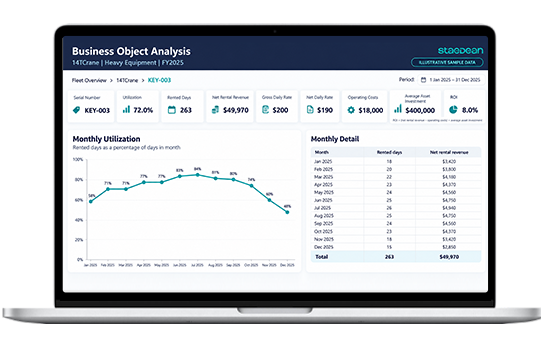
Monitor standard rental KPIs for utilization, revenue, sub-rental, service, and billing. Drill down from rental type to equipment group and individual machines, or ask questions in natural language using your connected rental data.
For example: “Which equipment groups ran below 60% utilization in the North region last quarter?”
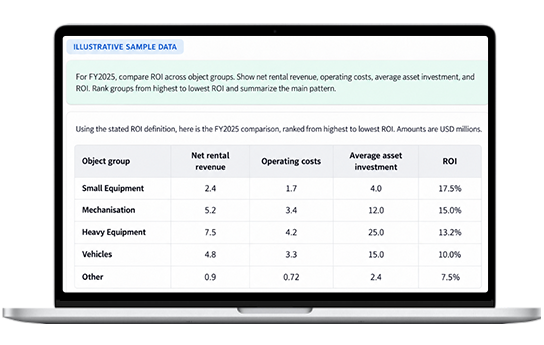
AI agents for rental decisions
The Equipment Availability Agent checks availability across locations, reservations, and planned returns. When a request cannot be met, it recommends suitable alternative equipment, equipment at another location, or a different rental period, prioritizing equipment you already own.
Your team reviews the recommendation and decides how to proceed.
See the Equipment Availability Agent in action
Assess the options before committing equipment
“Can I supply three compact excavators to the Rotterdam site next Monday for four weeks?”
Two units are available locally. A third is reserved for part of the requested rental period.
The Equipment Availability Agent identifies the conflict and suggests a suitable excavator at another location, prioritizing equipment you already own. This gives the rental team an alternative to assess before arranging an external sub-rental.
Illustrative scenario based on rental ERP data.
Where the value shows up
Review utilization alongside connected telematics and demand information to identify underused equipment and opportunities to deploy it where it is needed.
Review utilization, achieved rental rates, and demand together when deciding whether to maintain or adjust rates.
Check for suitable, available equipment across your locations before arranging an external sub-rental, making better use of equipment you already own.
Compare orders, quotes, and customer demand over time to assess equipment needs before deciding whether to transfer, sub-rent, or buy.
Review reservations, planned returns, and equipment location for the requested rental period, giving your team a clearer basis for confirming availability.
Find answers through shared KPIs, dashboards, and natural-language questions, so finance, operations, and sales work from consistent rental information.
Features
Unified Rental Data Model

Bring rental ERP data and information from connected sources together in a model covering contracts, rental types, equipment, locations, customers, and utilization. Built on Microsoft Azure and Microsoft Fabric, it provides consistent rental definitions for KPIs, reports, and AI capabilities.
Rental connections
Rental connections
Use out-of-the-box connections to STAEDEAN Equipment Rental ERP and CRM and Microsoft Rental Management in Microsoft Dynamics 365 Finance & Supply Chain Management. Add supported sources such as telematics, service and finance systems, other ERPs, spreadsheets, and external data.
Rental insights and answers

Monitor standard KPIs for utilization, revenue, sub-rental, service, billing, and equipment performance. Drill down from rental type to equipment group and individual machines, and extend reporting in Power BI. Ask questions in natural language using the Microsoft Fabric data agent.
Equipment Availability Agent

Ask about equipment availability for a specific location and rental period in natural language. The agent checks availability across locations, reservations, and planned returns. When the request cannot be met, it recommends suitable alternative equipment, equipment at another location, or a different rental period, prioritizing equipment you already own.
Extend Equipment Rental IQ
Create your own reports, KPIs, and AI solutions in Power BI and Microsoft Fabric using the same rental data foundation. Add data sources and develop capabilities as your reporting and operational requirements evolve.

Frequently asked questions
How is Equipment Rental IQ different from the reporting in my ERP?
Your ERP manages core rental operations and reports on those processes. Equipment Rental IQ works alongside it, bringing rental ERP data together with information from connected systems such as CRM, telematics, and service platforms. Teams can use dashboards, natural-language questions, and AI agents to explore this information and make better-informed decisions about equipment availability, utilization, and investment.
Do I need STAEDEAN Equipment Rental to use it?
No. Equipment Rental IQ provides out-of-the-box connections to STAEDEAN Equipment Rental ERP and CRM and Microsoft Rental Management in Dynamics 365 Finance & Supply Chain Management. Other rental systems and ERPs can also be connected, with integration and configuration based on your business requirements.
Which data sources can I connect?
In addition to the standard rental connections, supported sources can include telematics, CRM, service and finance systems, other ERPs, spreadsheets, and external data. STAEDEAN works with you to identify the relevant sources and the connections and configuration needed for your business.
What’s available today?
Equipment Rental IQ includes the platform, Unified Rental Data Model, rental KPIs, and dashboards. The Equipment Availability Agent is available in public preview. Further rental agents are in private preview with rental operators.
Natural-language questions use the Microsoft Fabric data agent, also in public preview, which requires enablement and configuration for your environment.
Can we customize dashboards, KPIs, and agents?
Yes. You can extend the standard dashboards with your own KPIs, measures, and reports in Power BI, and build your own agents and AI solutions using the same rental data foundation.
Resources
Scroll to
Maarten Kalf
Eric Van Hofwegen
Anastasia van der Wielen