See our Integration Solution for Dynamics 365 F&SCM in action!

Book your free demo today!
G2 rating STAEDEAN Microsoft Dynamics 365 ERP Solutions

https://2697631.fs1.hubspotusercontent-na1.net/hubfs/2697631/Data-Management/Banners/Control-MDM-in-D365-F&SCM-With-Our-Data-Governance-Solution.jpg

Simplify Integration, Migration, & EDI for D365 F&SCM

Simplify data movement even before you go live with the ERP using our solution. Accelerate and reduce the risk in your data migrations using our no-code embedded solution to transform, map, and move data from legacy systems to D365 F&SCM. Ensure fast, structured, and validated migrations for D365 F&SCM rollouts.  

Automated, no-code integrations connect Dynamics 365 with MES/SCADA, WMS, TMS, CRM, e-commerce, finance, and IoT platforms with real-time monitoring and alerts. . Enjoy data exports to your Bring Your Own Database (BYOD) at high speeds. 

Automate all supplier, customer, and logistics data exchanges directly inside D365. Order confirmations, shipping updates, and invoices flow uninterrupted, supported by error notifications, staging, and history tracking. Configure EDI messages and connect to EDI partners in weeks not months. Take full control of your data migration, integration, and EDI projects in-house. 

Key Challenges

Several customizations

Although you may consider customizations for data migrations, integrations, and EDI, it extends the timeline of the project. Not only do these customizations increase the cost but it also increases the risk in the ERP implementation.

Lack of validation

Organizations use custom EDI mappings that lead to errors. Frequent transaction failures lead to a support burden as they need to be corrected manually.​ There is no process to check incorrect inbound/outbound data and validate it to avoid such errors. 

Inflexible

When organizations move ERPs, they have complex legacy data files that require manual clean-up. Fragile integrations can fail due to the maintenance load, data in systems doesn’t align, and that can lead to chaos.​

Key Features

Scroll to

    Manage data movement efficiently

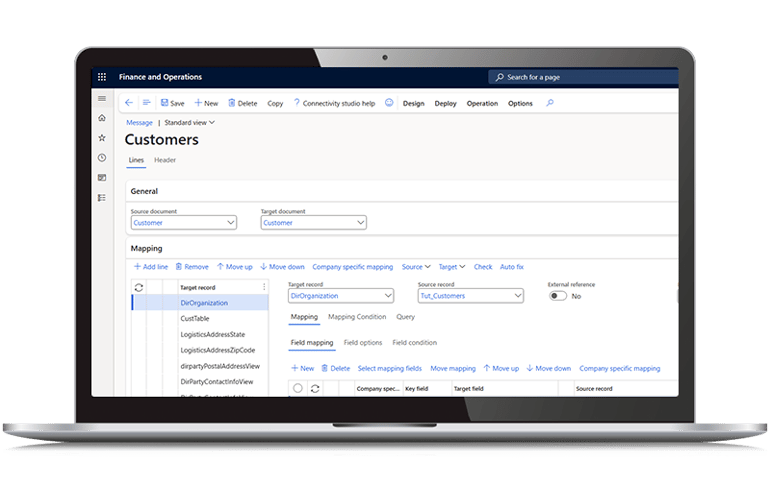
    Our solution allows you to simplify data migrations and integrations, no matter how complex. Whether it is moving data from multiple ERP systems, or integrating with on-premises systems, you can use placeholders (default values, conversions, etc) when you do not have the same data entities available in D365 F&SCM. Map data using any field or table and configure integrations with the support of multiple data formats and connectors.  
    https://www.staedean.com/hubfs/Data-Management/Screenshots/Manage-data-movement-efficiently.png

    Faster EDI processing

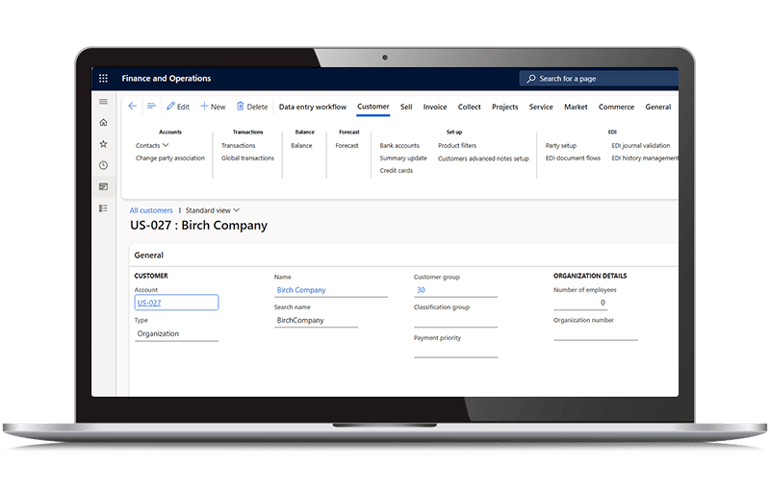
    You can fast-track EDI using our in-built tutorials within the system. These will help you configure and get started with simple messages such as orders and invoices in a matter of days. Additionally, since our solution is embedded within Dynamics 365 and built on our integration engine, you can get started quickly
    https://www.staedean.com/hubfs/Data-Management/Screenshots/Faster-processing.png

    Fast track migrations

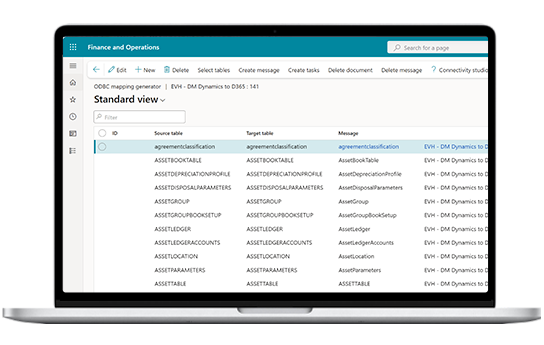
    Our Data Migration Accelerator templates help you speed up your data migrations from AX 2012/2009 to D365 F&SCM. Additionally, these templates can also be used for part of the data mapping for migration from any other system, be it NetSuite or Oracle. Our solution also offers multi-company import, parallel processing, and other features to speed up Dynamics 365 data migration projects. 
    https://2697631.fs1.hubspotusercontent-na1.net/hubfs/2697631/Data-Management/Screenshots/Fast-track-data-migrations.png
    Background sphere

    Benefits

    Built within Dynamics 365

    Built using the same logic and user experience, makes it easier to use. Additionally, you do not need to spend extra time switching between solutions.

    Manage multiple processes

    Our solutions do not block but enhance the power of the ERP. With our solution, you can use D365 F&SCM as a single system to manage multiple processes. 

    Full support provided

    After the initial training, you can drive all configurations in-house. We offer implementation services and post-go-live support based on your requirements.  

    Point-and-click solution

    Configure complex processes such as data mapping and transformations, security roles, EDI messaging, and more within Dynamics 365 F&SCM effortlessly, without development. 

    Monitor data movement

    Monitor EDI messages in staging, and data security in logged events. We also offer an app to monitor integration performance and health that helps you spot and reduce failures. 

    Scale as you grow

    Manage thousands of EDI messages, move high-volume of data from Dynamics 365 to your BYOD, and configure unlimited integrations between D365 and other systems.  

    Key Functionalities

    Low-risk data migrations

    Low-risk data migrations

    Get data migrations to Microsoft Dynamics 365 right the first time! Our no-code solution helps you move master and transactional data, data from customizations, and legacy ERP systems into D365 F&SCM in the right structure. Fast track the process using parallel processing, multi-threading and multi-company imports. 

    Simplified integrations and data exports

    Simplified integrations and data exports

    Fast-track implementations using configurations and multiple functionalities that leverage the power of the ERP without taxing the system. Also debug and monitor your integration performance proactively in our app built on Dataverse and powered by Power BI on the front end. 

    Easier EDI messages

    Easier EDI messages

    Validate data in staging and send and receive messages from your business partners from the ERP. Also manage EDI messages internally between D365 and other business systems such as WMS, 3PL, etc. using our solution.  

    Frequently asked questions

    Can't find what you're looking for?
    How often do you update and test your solutions based on Microsoft’s releases? 

    We do the heavy lifting so that you can focus on what is important! We test our solution with every Microsoft update and follow a quarterly release schedule. Additionally, we constantly work on adding new features based on customer and partner feedback, and advancements in technology. 

    Do we need to hire specialists to work with STAEDEAN’s solutions? 

    No, as our solutions are designed for business users. However, we always recommend a mixed team with technical and functional team members involved in the training and planning phases so that there is some understanding of Microsoft Dynamics 365 F&SCM and your organization’s business processes. After the initial training session, you should be able to manage migration, integrations, security, and EDI processes within the ERP in-house. 

    Why should I consider Data Integration and Migration Solution when Microsoft offers the Data Management Framework (DMF) for data mapping? 

    Although DMF facilitates data validation and mapping within Dynamics 365, it requires you to follow Microsoft’s data entities. If you have customizations in your old system or a complex integration, using DMF means more customizations. Our Data Integration and Migration Solution is compatible with data entities and offers the flexibility to use existing data entities or placeholders to manage integrations, migrations, and data movement without coding.

    Does your EDI solution support global standards? 

    Our solution supports EDIFACT and ANSI messages. We offer an EDI library for 6 EDIFACT messages and are working on extending the number of EDI messages based on customer and partner feedback. Additional messages can be configured without development. Our solution helps you integrate EDI messages with Dynamics 365. We offer the flexibility to integrate with any EDI broker of your choice that can help you translate EDI messages based on your business requirements.  

    Resources

    Scroll to

      TI_LOGO_TI-Logo-color andAXP_365

      have now rebranded to

      staedean-logo-teal