
Experience ECM+ in action

Book your free demo today.

G2 rating STAEDEAN Microsoft Dynamics 365 ERP Solutions

Achieve operational control and reduce disruptions

When an Engineering Change Order (ECO) is released, manufacturers need to understand what happens next. Orders may still use the old product version, inventory may no longer meet demand, and purchasing and production plans may need to change.

Without a centralized workspace, teams must check multiple Dynamics 365 screens, compare versions in spreadsheets, identify affected transactions, and decide what to do next. This takes time and increases the risk of mistakes.

ECM+ extends standard Engineering Change Management in Dynamics 365 with a workspace for assessing downstream impact and resolving affected transactions. It brings operational information, guided corrective actions, and action tracking together in one place, helping reduce manual work and prevent avoidable errors.

Key Challenges

Time-consuming manual follow-up
Teams move between sales, production, purchasing, planning, and inventory screens to understand the impact of an engineering change.
Limited visibility across operations

Orders and inventory may still rely on an outdated product version, increasing the risk of production issues, obsolete stock, and missed delivery commitments.

Limited traceability

Without a centralized record, it can be difficult to see which transactions were reviewed, what action was taken, and why.

Key Features

Scroll to

    ECO Impact Workspace

    Open ECM+ directly from the standard Engineering Change Order page in Dynamics 365. The Impact Workspace brings the downstream impact of a released ECO together in one view, showing affected transactions, their status, and what still needs attention.
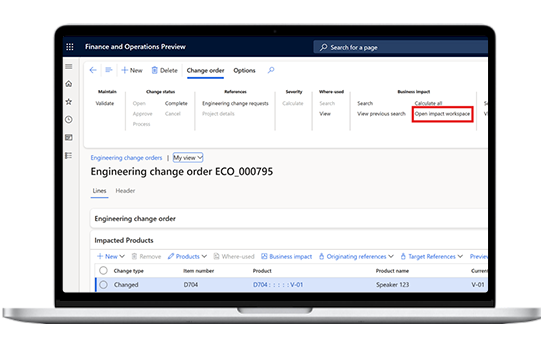
    ECO-Impact-Workspace

    Version-aware impact analysis

    Understand what changes between the old and new product versions. Review relevant product and engineering details, affected demand, and inventory information. For BOM changes, compare the old cost, new cost, and cost difference to help assess the operational implications.

    Version-aware-context-&-impact-calculation

    ECM+ Impact Agent

    Ask, “What's the impact of this ECO?” and receive a plain-language summary with a severity rating and an explanation of the reasoning behind it.

    Configure your own severity thresholds for Critical, High, Medium, and Low, based on the rules that matter to your business. Built with Microsoft Copilot Studio, the AI Impact Agent reads and explains information from Dynamics 365 but does not modify records or make decisions on your behalf.
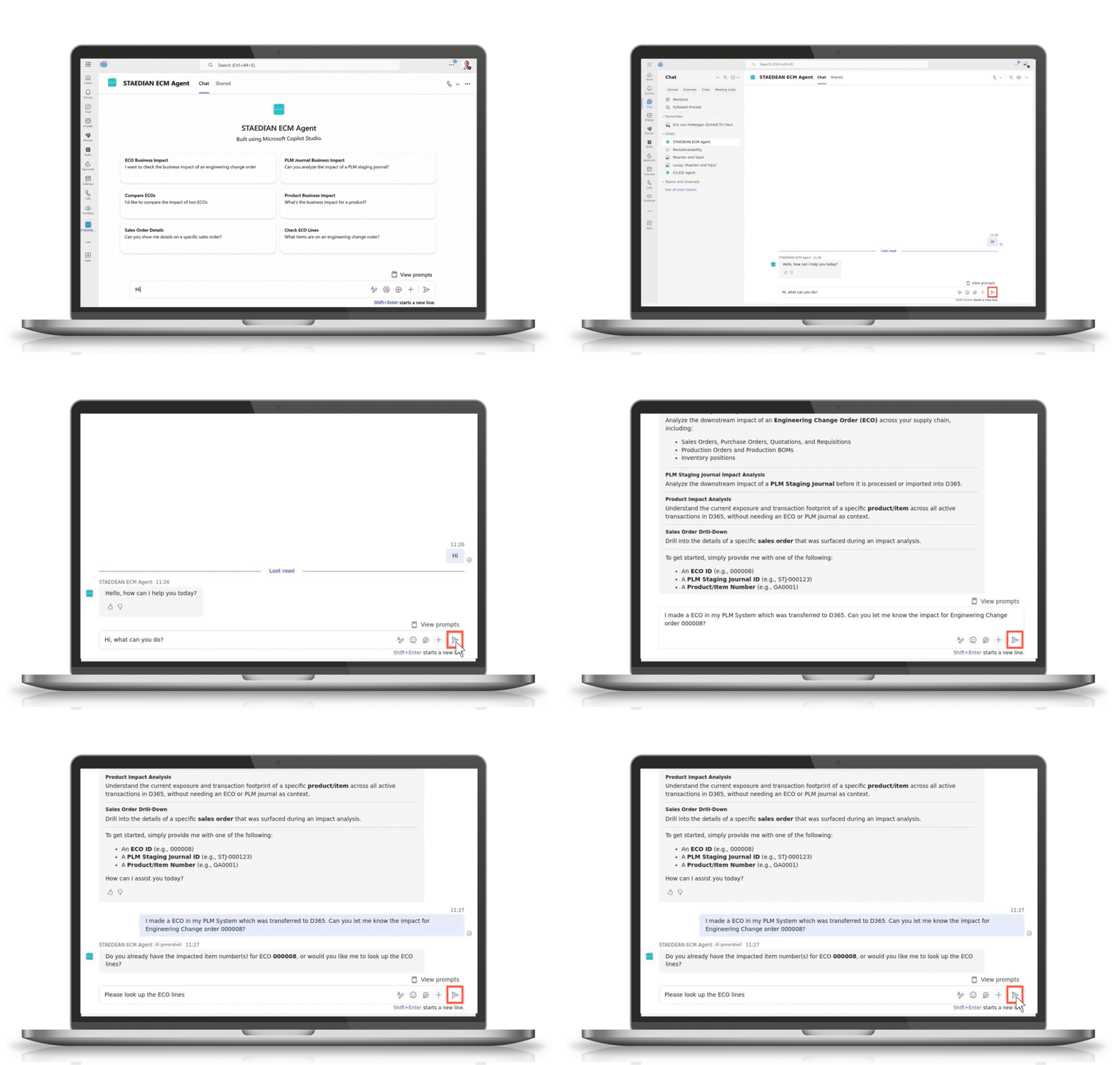

    ECM+ Impact Agent
    Background sphere

    Benefits

    Icons-Downtime
    Cut ECO cleanup effort roughly in half
    Reduce manual work and errors by managing engineering change follow-up actions in one workspace.
    Icons_360-degree-View-of-Assets
    Improve operational visibility 
    See affected transactions, product versions, inventory, supply, demand, and coverage gaps together.
    Icons_Faster-Time-to-Market
    Take actions faster

    Use guided corrective actions to resolve affected transactions directly from the Impact Workspace.

    Icons_Reduce-integration-failure
    Reduce execution risk
    Identify outdated orders, obsolete stock, and potential supply gaps while there is still time to act.
    Icons_Quick-start
    Understand the impact in seconds
    Use the AI Impact Agent to assess the severity of an engineering change and understand the reasoning behind its classification.
    Icons_Traceability
    Improve traceability 
    Track actions taken on affected transactions, helping teams understand what has been handled and what still requires attention.

    Explore ECM+ for Dynamics 365

    ECM+ extends standard Engineering Change Management in Microsoft Dynamics 365 Finance & Supply Chain Management. It helps manufacturers assess the downstream impact of engineering changes, manage transitions between product versions, and take guided corrective actions from one workspace.

    Key Functionalities

    ECO Impact Workspace
    ECO Impact Workspace

    A single workspace for released ECOs with line-level impact, KPI tiles, severity indicators, and read-only transaction grids.Review the impact of released ECOs in one place, with transaction details, status indicators, and a consolidated overview.

    Version-Aware KPIs

    Version-Aware KPIs

    Compare relevant inventory and supply figures for the old and new product versions, including on-hand, reserved, net available, incoming supply, outgoing demand, and coverage gaps. 

    Guided Corrective Actions
    Guided Corrective Actions

    Quickly resolve issues with status-aware, security-aware actions directly on  affected transactions across sales, production, planning, procurement, inventory, and BOMs.

    Lifecycle Governance

    Lifecycle Governance

    Change the lifecycle state of the previous product version and review the downstream implications before confirming.

    ECM+ Impact Agent

    ECM+ Impact Agent

    Ask questions about an engineering change and receive a plain-language explanation of its impact and severity, based on your configured business rules.


    Frequently asked questions

    Can't find what you're looking for?
    How is ECM+ different from standard Dynamics 365 Engineering Change Management?

    Standard Engineering Change Management manages the engineering change process and updates core engineering data, including product versions, BOMs, and routes.

    ECM+ extends these capabilities by helping teams assess which operational transactions are affected by a released change and take corrective action directly within Dynamics 365.

    Does ECM+ replace Product Lifecycle Management?

    No. ECM+ focuses on downstream impact and operational execution within Dynamics 365 Finance & Supply Chain Management after engineering change data enters the system.

    It complements STAEDEAN's PLM Integration Solution, which connects external PLM systems and data with Dynamics 365.

    Who is ECM+ designed for?

    ECM+ is designed for manufacturers using Dynamics 365 Finance & Supply Chain Management and standard Engineering Change Management.
    It can support supply chain planners, production planners and supervisors, procurement managers, engineering change analysts, and master data managers.

    Does the AI Impact Agent modify my data?

    .No. The AI Impact Agent is read-only and advisory. It summarizes information from your Dynamics 365 data and explains the rules behind its severity assessment. It does not modify records or execute corrective actions.

    Your team retains control over decisions and approvals, and corrective actions remain subject to your existing Dynamics 365 security permissions.

    TI_LOGO_TI-Logo-color andAXP_365

    have now rebranded to

    staedean-logo-teal