


Test your Dynamics 365 Data Quality for FREE!
Fill out the form below to get a free trial.

Benefits of Free Data Quality Solution trial for Microsoft Dynamics 365 F&SCM

Assess customer data
Our Data Quality Solution helps you perform a quality assessment on your existing customer data created in the Customer and Address table in D365.

Enrich new customer data
Using our Data Quality Solution, you can activate data quality rules to ensure that new customer data entered in D365 is accurate and of high quality.

Get post-assessment report
Upon assessing your data, our solution generates a report identifying any records that do not meet your policies, allowing for necessary updates.

Be notified of errors
You can apply data quality rules directly to customer data entry and update forms to help ensure accurate user input by showing error messages as necessary.

Free trial for 30-days
Along with our data quality template, D365 F&SCM customers will have free access to our Data Quality Solution for a trial period of 30 days.

Gain data quality support
Dynamics 365 customers who avail our free Data Quality Solution and template trial will also have access to online training materials and support from our experts.
Data Cleansing and Enrichment
With our solution, you can set up data actions to auto-update fields with certain values. They can be set up as conditional to match the values with your business requirements.
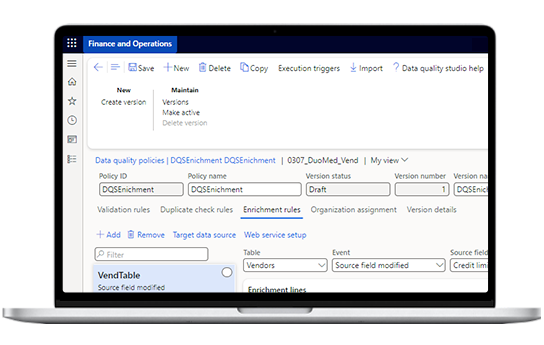
Monitor D365 User Interactions
Our no-code solution allows you to monitor data entry by users according to defined data quality policies. In case of any errors, users will get a clear message to make necessary corrections.
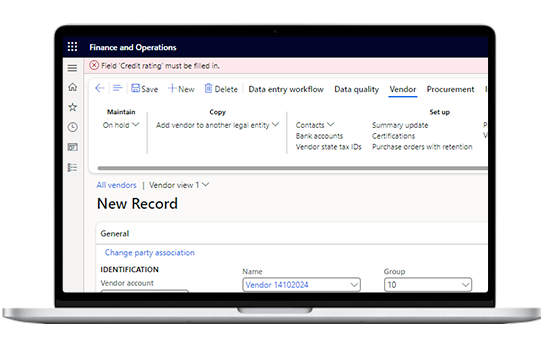
Perform Consistency Checks
Set up periodic consistency checks to check for records that do not meet validation rules and set up comparison rules on data content to prevent duplicate record entry in the application.


Refine Data Quality with STAEDEAN’s FREE Trial
Discover how to effortlessly improve the accuracy of your customer records in D365 F&SCM!
Experience how you can easily improve D365 data quality
Assess existing customer data with our free template
Activate data quality policies to flag user input errors